Author: Ashfak

  • The Web Just Changed: OpenAI Launches ChatGPT Atlas, an AI-First Browser

    The Web Just Changed: OpenAI Launches ChatGPT Atlas, an AI-First Browser

    The browser wars, long thought settled, have just been blown wide open. In a move that shifts the entire AI landscape, OpenAI—the company behind ChatGPT—has officially launched ChatGPT Atlas, a standalone, AI-first web browser.

    This isn’t just another version of Chrome or a simple plugin. It’s a fundamental reimagining of how we interact with the internet, moving from passively clicking links to actively collaborating with an AI agent that browses with you and for you.

    For developers, businesses, and tech leaders, this is a watershed moment. The web is no longer just a collection of static pages; it’s becoming an interactive, agentic environment. Here at WebloomLabs, we’re breaking down what ChatGPT Atlas is, why it matters, and what you need to do to prepare.


    What Is ChatGPT Atlas?

    At its core, ChatGPT Atlas (initially available for macOS) is a web browser built on Chromium. But unlike Google Chrome, which treats search as its entry point, Atlas uses a conversational AI as its core interface.

    Think of it this way: for the past year, you’ve had to go to ChatGPT to ask questions. With Atlas, ChatGPT comes with you, living in a persistent sidebar and actively observing, understanding, and interacting with every page you visit.

    This new paradigm is built on three revolutionary features.

    Preview of ChatGPT Atlas

    The 3 Core Features That Redefine Browsing

    1. The “Chat Anywhere” Contextual Sidebar

    This is the most visible change. Atlas features an integrated ChatGPT sidebar that is “page-aware.”

    When you’re on a webpage, you can instantly ask questions about that page.

    • On a GitHub repo? “Explain this new commit to me.”
    • Viewing a product? “Find reviews for this and compare it to its main competitor.”
    • In your Gmail? “Draft a professional reply to this email, referencing the document I had open a minute ago.”
    “Chat Anywhere” in Action

    This eliminates the constant copy-pasting between tabs, turning the browser itself into an active reasoning engine.

    2. Browser Memories

    This is where it gets personal. ChatGPT Atlas introduces “Browser Memories,” an optional feature that allows the AI to remember context and details from your browsing history.

    It’s not just a search history; it’s a contextual history. You can ask:

    • “What was that JavaScript framework I was researching last Tuesday?”
    • “Find all the job postings I looked at last week and summarize the key requirements.”
    • “Re-open that hotel booking site I was on.”
    ChatGPT Atlas Browser Memories in action

    This feature allows Atlas to build a personalized understanding of your projects, interests, and tasks, making its assistance more relevant over time. OpenAI states users have full control to view, archive, and delete these memories.

    3. “Agent Mode”: The True Game-Changer

    This is the big one. “Agent Mode” (launching in preview for subscribers) is the first mainstream glimpse of a true AI “super-assistant.”

    When you activate Agent Mode, you can give ChatGPT a high-level goal, and it will take autonomous actions on your behalf. It will navigate websites, fill out forms, click buttons, and even make purchases.

    In demos, users tasked the agent with:

    • “Research a 3-day trip to Austin, find a hotel near the center, and book the flights.”
    • “Take this recipe and order all the ingredients for delivery from Instacart.”

    The AI performs these multi-step tasks while you watch, effectively turning the entire internet into its personal toolkit.


    The “So What” for Developers and Businesses

    This isn’t just a new tool for consumers; it’s a new challenge—and opportunity—for creators. At WebloomLabs, we see three immediate implications.

    1. A New Kind of User: The AI Agent

    Until now, we’ve designed websites for human users. We optimized for human eyes (UI) and human experience (UX). With Agent Mode, we must now start designing for AI agents.

    If your website is difficult to navigate, relies on non-standard UI elements, or has a confusing checkout process, an AI agent will fail. “Agent-Friendliness” will become a new metric of success.

    2. The Unreasonable Effectiveness of Semantic HTML

    How does the AI agent know what to click? It’s not (just) magic. The search results and technical blogs confirm it: ChatGPT Atlas heavily relies on WAI-ARIA tags and semantic HTML.

    This is a massive win for web accessibility.

    That aria-label="Add to Cart" tag is no longer just for screen readers; it’s now the primary instruction set for AI agents. If your site is a mess of <div> tags with no semantic meaning, the Atlas agent won’t be able to understand or use your site.

    The takeaway: Clean, semantic, and accessible HTML is no longer a “nice-to-have.” It is now a critical business requirement for an AI-driven web.

    3. The New Platform War for Clicks and Commerce

    ChatGPT Atlas is a direct, existential threat to Google’s search-and-ad empire.

    Why would a user go to Google, click an ad, and browse your site if they can just ask the Atlas agent to “find the best price for X and buy it”?

    This shifts the battleground from “Search Engine Optimization (SEO)” to “Agent Optimization.” The new questions are:

    • Will the AI agent recommend your product?
    • Is your API accessible and well-documented so agents can plug into it?
    • Is your site structured so the agent can successfully complete a purchase?

    Our Verdict: The Web is Now in Motion

    ChatGPT Atlas is the most significant development in web browsing since the launch of Google Chrome. It signals the end of the static web and the beginning of a dynamic, conversational, and automated internet.

    The competition is already fierce. Google is integrating its Gemini AI deeply into Chrome, Microsoft is all-in on Copilot for Edge, and AI-native browsers like Perplexity are carving out their own niches. But with its powerful “Agent Mode” and massive user base, OpenAI has just thrown down the gauntlet.

    The web is being rebuilt, and businesses that don’t adapt will be left behind.


    Is your website ready for the Agentic Web?

    The launch of ChatGPT Atlas proves that the future is AI-driven. At WebloomLabs, we’re not just building websites; we’re designing intelligent, future-proof platforms ready for the next generation of users—both human and AI.

    Contact us today to schedule an “Agent-Ready” audit of your web platform.

  • AWS Meltdown: Is Your Business Next? What the US-EAST-1 Outage Means for You (and How to Survive the Next One)

    AWS Meltdown: Is Your Business Next? What the US-EAST-1 Outage Means for You (and How to Survive the Next One)

    Date: October 20, 2025


    Amazon has officially confirmed the ongoing issues on its AWS Health Dashboard. The problem is centered in the US-EAST-1 (North Virginia) region and is causing “increased error rates and latencies” for multiple services.

    Crucially, this is also affecting the AWS Support Center, meaning it’s difficult for customers to create or update support cases.

    AWS has stated: “We are actively engaged and working to both mitigate the issue and understand root cause.”

    There is no estimated time for resolution yet. We are seeing major services from gaming (Roblox, Fortnite) to productivity (Canva, Asana) and even crypto (Coinbase) confirming they are impacted by this AWS-level problem.

    We will continue to update this post as new information becomes available. The original analysis from this morning is below.


    Original Post

    If you’re starting your week staring at a screen of 500-errors, connection timeouts, and red-alert dashboards, you are not alone.

    As of this morning, a significant portion of the internet is experiencing widespread issues. Your favorite productivity tools, streaming services, and even your own applications are likely feeling the heat. The culprit? A major outage at Amazon Web Services (AWS), specifically originating from their massive us-east-1 region in North Virginia.

    At Webloom Labs, we build, manage, and scale web infrastructure. When an event like this happens, it’s all hands on deck. Here’s our deep dive into what’s happening, why it’s so widespread, and the technical lessons we can all learn from it.

    What’s Broken? The “Capital City” of the Cloud is Hurting

    The problem is centered on AWS us-east-1. To understand why this is a catastrophe, you have to understand that not all AWS regions are created equal.

    us-east-1 is the original AWS region. It’s the “capital city” of Amazon’s cloud empire. It’s the largest, houses the most services, and is the default region for countless developers and automated scripts. Because of its age and scale, it’s an incredibly complex piece of infrastructure. When it hiccups, the entire internet feels the tremor.

    Amazon has officially acknowledged the issue on its AWS Health Dashboard, which is the single source of truth for any outage.

    The reports point to “increased error rates” for two fundamental services:

    1. Amazon EC2 (Elastic Compute Cloud): Think of EC2 as the rental apartments for code. They are the virtual servers—the “compute” power—where applications actually live and run. When EC2 fails, the lights go out.
    2. Amazon DynamoDB (NoSQL Database Service): If EC2 is the apartment, DynamoDB is the super-fast, intelligent filing cabinet. It’s the database that stores and retrieves user data, profile info, and application states in milliseconds. When it fails, the application can’t find its data.

    When these core “building blocks” fail, the complex structures built on top of them (like Canva, Duolingo, or even your own company’s software) collapse.

    The Blast Radius: Who is Down?

    The list of affected services is growing by the minute. Because us-east-1 is a default for so many, even companies that think they are global are often unknowingly dependent on it for a critical login service, a user database, or a payment processing-gateway.

    Reports are flooding in from users on sites like Downdetector for major platforms, including:

    • Canva
    • Duolingo
    • Perplexity AI
    • Snapchat
    • Roblox & Fortnite
    • Coinbase
    • …and thousands of other B2B and B2C services.

    Live Reactions from the Outage

    You don’t have to take our word for it. The outage has been felt across the industry. Here’s a look at how major services are communicating with their users.

    Perplexity AI’s CEO confirms the root cause:

    Fortnite Status acknowledges the problem:


    A developer sums up the feeling:

    Amazon delivery drivers ‘can’t move any product:

    Canva says:

    Your Immediate 4-Step Action Plan

    When an event like this happens, it’s easy to panic. Don’t. Be methodical.

    1. Confirm, Don’t Assume. Your first click should be the AWS Health Dashboard. Your second should be your own monitoring tools (like Datadog, New Relic, or Sentry). See how this outage is specifically affecting your error rates and latency.
    2. Communicate Proactively. Get ahead of the support tickets. Put up a banner on your site and update your own status page (using a tool like Atlassian’s Statuspage or Instatus). Transparency builds trust. A simple: “We are aware of a major AWS outage affecting our service. We are monitoring the situation and will update you as soon as Amazon resolves the issue” is perfect.
    3. Freeze All Deployments. This is critical. Do not be a hero. Do not try to push a “fix” into a failing environment. You risk compounding the problem, corrupting data, or making a simple restart impossible. Freeze all automated CI/CD pipelines targeting the us-east-1 region immediately.
    4. Arm Your Support Team. Your support channels are probably on fire. Give your team the correct information. Let them know it’s a widespread AWS issue and that your engineering team is monitoring for recovery.

    The Long-Term Fix: This is a Drill, Not the Apocalypse

    Today’s outage is a powerful—and expensive—reminder: planning for failure is not optional.

    For years, developers (especially at startups) have fallen into the ” us-east-1 trap.” It’s the default, it’s easy, and it’s where you build your first product. But in doing so, you create a massive Single Point of Failure (SPOF).

    The technical solution is a multi-region architecture.

    Think of it like having a backup office in a different city. If your main office in Virginia (us-east-1) floods, you can re-route all operations to your backup office in Oregon (us-west-2).

    In AWS terms, this involves a few key technologies:

    • Amazon Route 53: This is AWS’s DNS (Domain Name System). You can configure it with “health checks” that automatically detect when us-east-1 is sick and stop sending your users’ traffic there. It will instantly re-route all traffic to your healthy us-west-2 environment.
    • Data Replication: You must have a copy of your data in the backup region. Services like Amazon Aurora Global Database or DynamoDB Global Tables are designed for this. They automatically replicate your data across multiple regions in near-real-time.
    • Stateless Applications: Your EC2 servers should be “stateless.” This means the server itself doesn’t store any critical data. It can be shut down, destroyed, and replaced at a moment’s notice without any loss. The “state” (i.e., user data) is kept separately in a database like DynamoDB or RDS.

    Yes, this architecture costs more. It adds complexity. But what is the cost of today’s outage to your business? For most, the insurance policy of a multi-region design is well worth the price.

    Our Final Take

    Incidents like this are scary, but they are also incredible learning opportunities. The cloud is not an infallible magic box; it’s a physical set of computers in a very specific building, and those computers can fail.

    Today is a test of your systems, your processes, and your communication. How did you hold up?

    We’ll be monitoring the situation and will post updates as AWS works toward a resolution. Stay patient, and good luck.

  • Busy Founder’s Guide to AI Delegation: Reclaim Your Time & Boost Growth

    Busy Founder’s Guide to AI Delegation: Reclaim Your Time & Boost Growth

    In the whirlwind world of entrepreneurship, founders often find themselves juggling countless tasks, from strategic planning to mundane administrative duties. The dream of scaling a business can quickly turn into a relentless cycle of endless to-do lists, leaving little time for innovation or personal well-being. But what if there was a way to dramatically reduce your workload, reclaim precious hours, and propel your business forward? Enter AI delegation. This Busy Founder’s Guide to AI Delegation will illuminate how modern artificial intelligence tools can become your most powerful ally, transforming your operational efficiency and freeing you to focus on what truly matters: strategic growth and vision.

    The concept isn’t about replacing human ingenuity, but augmenting it. It’s about empowering founders to move beyond the minutiae and leverage intelligent automation for tasks that are repetitive, data-heavy, or pattern-following. As the landscape of business evolves, the ability to effectively delegate to AI is no longer a luxury but a necessity for staying competitive and fostering sustainable growth.

    Why AI Delegation is Your Strategic Advantage

    For the busy founder, time is the ultimate currency. Every minute spent on a low-leverage task is a minute not invested in high-impact activities like product development, strategic partnerships, or fostering company culture. AI delegation offers a powerful solution, saving time and boosting revenue by offloading manual and time-consuming tasks. Imagine freeing yourself from the grind of writing endless product blurbs, meticulously tracking returns, or constantly tweaking website layouts. This is the promise of AI.

    As highlighted by ConvertCart’s insights on delegating eCommerce tasks to AI, founders can delegate 20 specific tasks to AI, leading to significant time savings and increased revenue. AI excels at tasks that are performed daily or weekly, involve heavy data processing, and follow discernible patterns – essentially, work you’d typically hire someone to do. This strategic shift allows you to focus on your unique genius, the vision, and the human connections that only you can provide.

    The Busy Founder’s Guide to AI Delegation: Where to Start

    The journey into AI delegation doesn’t have to be daunting. The most effective approach, particularly for busy founders and executives, is to start with personal engagement. As Barry O’Reilly emphasizes for executives adopting AI, successful integration begins with the leader’s hands-on experience, not just delegating the ‘doing’ to a team. This personal leadership fosters credibility and a deeper understanding of AI’s capabilities and limitations, enabling you to guide your company’s adoption more effectively.

    Begin by identifying your personal daily workflow friction points – those repetitive, overwhelming tasks that consistently consume your time and energy. Is it drafting emails, summarizing long documents, organizing meeting notes, or conducting preliminary research? By applying AI to these personal pain points first, you build a foundational understanding and gain immediate productivity boosts. Think BIG, Start Small, Learn Fast. This iterative approach allows for rapid learning and refinement of your AI delegation strategy.

    20+ Tasks a Busy Founder Can Delegate to AI Today

    The scope of AI delegation is vast, touching almost every facet of business operations. Here’s a breakdown of categories and specific tasks where AI can significantly lighten a busy founder’s load, helping you implement this Busy Founder’s Guide to AI Delegation:

    Product & Storefront Management

    • Writing Product Descriptions: AI can generate compelling and SEO-friendly product blurbs in seconds, saving hours of manual writing.
    • Updating Product Listings: Automate the process of refreshing inventory, pricing, and product details across various platforms.
    • Brainstorming Product Ideas/Mockups: Use generative AI to explore new product concepts or visualize design variations.
    • Competitor Research: AI can quickly analyze competitor offerings, pricing strategies, and market positioning.
    • Pricing Optimization: Leverage AI to dynamically adjust pricing based on demand, inventory, and competitor activity.
    • Identifying Bundling/Cross-selling Opportunities: AI can analyze customer purchase data to suggest optimal product bundles or cross-sell recommendations.
    • Generating Category/Landing Pages: Quickly create content and structure for new store categories or promotional landing pages.

    Marketing & Content Creation

    Marketing is a prime area for AI delegation, from content generation to audience analysis.

    • Picking and Researching Trends: AI tools can identify emerging market trends, popular keywords, and consumer interests to inform your content strategy.
    • Generating Ad Creatives/Captions/Copy: Create diverse ad variations, compelling headlines, and persuasive ad copy for various platforms.
    • Creating Podcasts/Product Demos/Avatars: AI-powered tools can assist in scriptwriting for podcasts, generating voiceovers, creating realistic product demos, or even designing virtual avatars for presentations.
    • Monitoring Competitors/Market: Set up AI to track competitor marketing campaigns, social media activity, and industry news.
    • Mapping Complex Customer Journeys: AI can analyze customer behavior data to visualize and optimize conversion funnels.
    • Repurposing Content Across Platforms: This is a game-changer for content efficiency. As detailed by Growbo’s guide on repurposing coaching content, AI tools can transform a single piece of content (e.g., a blog post) into social media snippets, email sequences, video scripts, and more, adapting it for platforms like Instagram or LinkedIn.

    Operations & Strategy

    Beyond the customer-facing aspects, AI can streamline critical back-end and strategic functions.

    • Writing Legal/Policy Documents: While requiring human review, AI can draft initial versions of privacy policies, terms of service, or internal guidelines, significantly speeding up the process. Even complex tasks like compiling legal research, as a lawyer described doing with Lawclerk for human assistants, can be partially automated with AI-powered legal research tools.
    • Handling Taxes/Returns/Finance Ops: AI can categorize expenses, reconcile accounts, flag discrepancies, and even assist with initial tax preparation, though final oversight is crucial.
    • Managing Internal Comms/Task Flows: Automate routine internal communications, track project progress, and manage task assignments within your team.
    • Translating Complex Technical Tasks: AI can simplify technical documentation or user manuals, making complex information accessible.
    • Forecasting Demand/Automating Pricing: AI algorithms can analyze historical data and market trends to predict future demand and automate pricing adjustments.
    • Optimizing the Supply Chain: From inventory management to logistics, AI can identify inefficiencies and suggest improvements for a leaner supply chain.
    • Handling Complex Customer Inquiries: Advanced AI chatbots can manage a significant portion of customer support, answering FAQs and escalating complex issues to human agents.

    Building Your AI Delegation Stack: Essential Tools for Founders

    To effectively implement this Busy Founder’s Guide to AI Delegation, you’ll need the right tools. The market is flooded with AI solutions, but a few foundational tools can make a significant difference in a founder’s daily productivity. Barry O’Reilly suggests building a personal AI productivity stack with tools that address common friction points.

    Core AI Productivity Tools:

    • Transcription Services (Otter.ai/Fireflies.ai): Automatically transcribe meetings, interviews, and calls, saving hours of manual note-taking.
    • Content Drafting & Analysis (ChatGPT, Claude, Gemini): Powerful generative AI tools for drafting emails, blog posts, social media content, summaries, and analyzing complex information.
    • Writing Clarity & Enhancement (Grammarly/Wordtune): Refine your writing, improve grammar, enhance readability, and rephrase sentences for impact.
    • AI-Powered Search (Perplexity.ai): Go beyond traditional search engines, using AI to provide direct answers and synthesize information from multiple sources.
    • Knowledge Structuring (Notion AI/Mem.ai): Organize your thoughts, manage projects, and structure information more efficiently with AI assistance.

    Enabling Technologies for Enhanced Delegation:

    While not strictly AI, these tools are crucial for a robust delegation framework, whether to human VAs or AI, as highlighted in Tim Ferriss’s interview with Sam Corcos:

    • Loom: For low-friction screen recording. It’s invaluable for creating asynchronous communication, recording workflows for AI prompt engineering or training human VAs, and debugging processes. As Corcos states, “content scales, time does not.”
    • Notion: A comprehensive workspace for task databases, onboarding checklists, and process documentation, often with Loom recordings embedded for transparency.
    • Calendly: Streamlines scheduling by allowing self-serve booking of available time slots, eliminating back-and-forth emails.
    • Superhuman & Hotkeys: Maximize email processing efficiency. Learning keyboard shortcuts (hotkeys), as Corcos pointed out, can boost productivity by 10-40% for life – a “free productivity boost” often overlooked.

    Mastering the Art of AI Delegation: Principles for Success

    Delegating to AI isn’t simply about pressing a button; it’s an art that requires strategic thinking and careful execution. To truly leverage this Busy Founder’s Guide to AI Delegation, keep these principles in mind:

    Provide Clear and Specific Inputs

    One of the biggest pitfalls when delegating to AI is providing vague inputs. AI is only as good as the instructions it receives. Be explicit about your expectations, desired format, tone, audience, and any constraints. The more precise your prompt, the better the output. Think of it like training a new, incredibly fast but literal assistant.

    AI is Not Autopilot – Human Oversight is Crucial

    Never assume AI works on autopilot. Always maintain human QA and feedback loops, as noted by ConvertCart. AI can generate content, analyze data, or even manage workflows, but it lacks human judgment, nuance, and ethical reasoning. Treat AI outputs as a first draft or a powerful assistant that still needs your expert review and guidance.

    Assign Human Ownership and Responsibility

    Even when AI performs a task, a human must ultimately be accountable for the outcome. Assigning human ownership ensures that AI outputs are vetted, refined, and align with your business goals and values. This creates a safety net and fosters a culture of responsibility.

    The “To-Do List to Calendar” Shift, Amplified by AI

    Sam Corcos’s core time management tactic of moving tasks from an infinite to-do list to finite calendar blocks is powerful. When combining this with AI, you can not only block out time but also use AI to execute the tasks within those blocks. For example, block out “email processing,” then use Superhuman and AI snippets. Block “content creation,” then use ChatGPT to draft. This confronts capacity limits and reduces stress.

    Think BIG. Start Small. Learn Fast.

    Don’t try to automate everything at once. Following Barry O’Reilly’s advice, identify one daily friction point, activate a relevant AI tool, experiment daily, and capture both wins and frustrations. This iterative 90-day roadmap allows you to build your personal AI stack, integrate AI into one team or function, and gradually scale your strategy across the business. The goal is continuous learning and adaptation, as AI technology evolves rapidly.

    Beyond AI: The Broader Delegation Mindset

    While this guide focuses on AI, the principles of delegation extend to human virtual assistants (VAs). Sam Corcos, co-founder of Levels, is a champion of “10x delegation” and working with VAs for over a decade, a discussion highlighted in Tim Ferriss’s LinkedIn post and the full transcript. The core mindset of “winning freedom by letting go” is universal, whether you’re delegating to a human or an algorithm. Overcoming imposter syndrome, meticulously documenting processes (with tools like Loom and Notion), and finding tasks, no matter how small, are crucial for effective delegation. Companies like Wishup showcase how pre-trained human VAs can also be integrated into a founder’s delegation strategy, often working alongside AI tools for maximum efficiency.

    Embracing delegation, in all its forms, is about leveraging resources to amplify your impact. It allows you to protect your attention, reduce anxiety, and prioritize deep work and strategic thinking, much like Corcos’s practice of “news sobriety” to focus on valuable information.

    Conclusion

    The role of a founder is inherently demanding, but it doesn’t have to be overwhelming. By strategically embracing AI delegation, you unlock an unparalleled opportunity to reclaim your most valuable asset: time. This Busy Founder’s Guide to AI Delegation provides a roadmap to offload repetitive tasks, enhance productivity, and refocus your energy on innovation, growth, and the human elements that truly differentiate your business. Start small, experiment often, and empower yourself with the intelligent tools that are reshaping the entrepreneurial landscape.

    Ready to transform your business operations with cutting-edge strategies and expert guidance? Webloom Labs is here to help you navigate the complexities of digital transformation and AI integration. Take the first step towards a more efficient and impactful future.

    Get Started with Webloom Labs Today!

  • Fix Chatbots That Don’t Convert: Your Guide to Boosting Digital Engagement

    Fix Chatbots That Don’t Convert: Your Guide to Boosting Digital Engagement

    In today’s fast-paced digital landscape, chatbots have become ubiquitous, promising enhanced customer service, streamlined operations, and a significant boost to lead generation. Yet, for many businesses, the reality falls short of the hype. You’ve invested in an AI assistant, but it just isn’t delivering. Your chatbot is interacting with users, but those interactions aren’t translating into the desired actions—be it a sale, a sign-up, or a qualified lead. In short, you need to fix chatbots that don’t convert. This comprehensive guide will delve into the core reasons behind chatbot underperformance and provide actionable strategies to turn your digital assistant into a true conversion powerhouse.

    The journey from a promising AI tool to a non-converting one is often paved with good intentions but lacks strategic execution and a deep understanding of user behavior. It’s not enough to simply deploy a chatbot; to truly succeed, you must optimize, refine, and continuously adapt it to meet both your business objectives and your users’ needs.

    The Promise vs. The Reality: Why Chatbots Often Miss the Mark

    The allure of artificial intelligence is powerful, with promises of automating tasks and revolutionizing customer interactions. We’ve seen the incredible capabilities of Recurrent Neural Networks (RNNs) and Large Language Models (LLMs) in generating coherent text, understanding context, and even assisting with complex coding tasks. These foundational technologies allow chatbots to process and respond to natural language with impressive sophistication.

    However, the gap between the theoretical potential of AI and its practical application in many businesses is significant. As some critics rightly point out, the current AI hype can often mask a lack of fundamental operational and cultural competence within organizations. Many companies, in their eagerness to embrace the latest trend, may not have the solid internal processes or clear problem definitions necessary to implement complex AI solutions successfully. This often leads to a situation where a chatbot is deployed, but without a clear strategic purpose, robust testing, or proper integration, it simply fails to meet expectations. The result? A digital assistant that engages users but ultimately fails to convert them.

    The crucial first step to effectively fix chatbots that don’t convert is to honestly assess whether the underlying business processes and objectives are solid. Without this, even the most advanced AI will struggle to deliver tangible value. It’s about ensuring that your organization is ready to harness AI effectively, rather than just blindly adopting it and expecting miracles.

    Identifying the Conversion Killers in Your Chatbot

    Before you can implement solutions, you need to diagnose the problems. Why isn’t your chatbot converting? The issues can range from technical flaws to strategic missteps. Here are some common “conversion killers”:

    1. Generic, Unhelpful, or Off-Brand Responses

    One of the quickest ways to alienate a user is for your chatbot to sound like, well, a robot. Generic, canned responses that lack personality or fail to directly address a user’s query create a frustrating experience. Your chatbot needs to sound like your brand and provide truly helpful information. If it doesn’t, users will quickly disengage. Think about how a skilled writer cultivates a unique voice; the same applies to your chatbot. Training an AI to adopt your brand’s unique voice and style is critical, as highlighted in guides on turning AI chatbots into better writing partners by feeding them specific examples of your best work.

    2. Lack of Clear Purpose and User Journey

    Does your chatbot have a defined mission? Is it clear to the user what the chatbot can help them achieve? Many chatbots fail because they try to be all things to all people, or they lack a clear path for the user to follow towards a specific goal. Without a well-defined user journey, interactions become aimless, and conversions plummet.

    3. Poor User Experience (UX) and Accessibility

    A chatbot, like any digital interface, must be intuitive and easy to use. Clunky interfaces, slow response times, or difficulty understanding user input can quickly lead to abandonment. Furthermore, accessibility is paramount. Just as a website needs to be accessible, your chatbot should be designed with all users in mind. Overlooking even seemingly minor design or functionality issues can accumulate into a poor user experience. For example, issues like extensive accessibility errors in digital content can severely hamper user engagement and conversion rates.

    4. Technical Glitches and Insufficient Error Handling

    Frequent errors, dead ends, or an inability to handle unexpected user inputs will quickly erode trust. If your chatbot can’t gracefully recover from a misunderstanding or a technical hiccup, users will become frustrated and abandon the conversation.

    5. Misunderstanding Complex Queries or Emotional Nuance

    While AI has advanced significantly, there are still inherent limitations, especially in tasks requiring deep empathy, nuanced understanding, or complex problem-solving. Trying to use a chatbot for roles that demand genuine human connection, like therapy, can be not only ineffective but potentially harmful, as discussed in the dangers of using ChatGPT as therapy. In a business context, pushing a chatbot beyond its capabilities can lead to frustrated users and missed conversion opportunities.

    Strategic Fixes to Make Your Chatbot a Conversion Powerhouse

    Now that we’ve identified the common pitfalls, let’s explore how to effectively fix chatbots that don’t convert and transform them into valuable assets.

    1. Define Clear Goals and User Journeys

    Before you write a single line of code or train any AI model, clearly articulate what you want your chatbot to achieve. Is it to answer FAQs, qualify leads, provide customer support, or guide users to a specific product? For each goal, map out the ideal user journey. What questions will they ask? What information do they need? What is the ultimate call to action? A clear purpose ensures every interaction drives towards a measurable outcome.

    2. Master Your Chatbot’s Voice, Tone, and Personalization

    Your chatbot is an extension of your brand. It must embody your company’s voice and tone. This goes beyond generic pleasantries; it involves training the AI with your specific content and brand guidelines. By feeding your chatbot a curated set of your best writing, you can personalize its writing style, ensuring consistency and authenticity. This level of customization makes interactions feel more human and trustworthy, significantly increasing the likelihood of conversion. Remember, a chatbot that sounds like your brand is more likely to resonate with your audience.

    3. Leverage AI for Better Chatbot Development and Testing

    The irony isn’t lost on us: sometimes, you need AI to fix AI. Modern AI-powered development tools can dramatically improve the efficiency and quality of your chatbot development process. Think of how developers use tools like Cursor for AI-powered coding and debugging, enabling “YOLO mode” for automatic error fixing and adopting a test-driven AI workflow. Similar principles can be applied to chatbot development:

    • Automated Testing: Use AI to generate test cases and simulate conversations, identifying common failure points or conversational dead ends.
    • Error Identification & Correction: Implement AI to analyze chatbot logs and user interactions, pinpointing where conversations break down or where responses are unhelpful. This is akin to Cursor fixing TypeScript builds or build errors by running commands and iterating on fixes.
    • Response Optimization: AI can suggest alternative phrasings or more effective response structures based on conversion data.

    Rigorous testing and continuous iteration, often aided by AI tools, are paramount to building a robust and high-converting chatbot.

    4. Enhance User Experience (UX) and Accessibility

    A seamless user experience is non-negotiable. Ensure your chatbot interface is clean, intuitive, and loads quickly. Provide clear options, guide the user through the conversation, and offer easy ways to either escalate to a human agent or restart the interaction if needed. Proactive error handling, where the chatbot gracefully admits limitations and offers alternatives, is far better than a dead end. Consider accessibility from the outset; just as a website needs to cater to all users, so too does your chatbot. Simple design choices can prevent issues like those seen with widespread accessibility errors that detract from the user experience.

    5. Smart Integration and Data Utilization

    Your chatbot shouldn’t operate in a silo. Integrate it with your CRM, knowledge bases, and other business systems. This allows the chatbot to pull relevant customer data for personalized interactions and push qualified leads directly into your sales pipeline. Furthermore, robust analytics are crucial. Track key metrics such as conversation completion rates, deflection rates, customer satisfaction scores, and, most importantly, conversion rates. Use this data to continuously identify bottlenecks and areas for improvement, iterating on your chatbot’s performance.

    Beyond the Hype: Building a Sustainable Chatbot Strategy

    The journey to effectively fix chatbots that don’t convert is an ongoing one, not a one-time deployment. It requires a realistic perspective, understanding both the immense opportunities and the significant challenges and concerns associated with generative AI, including potential biases, data privacy, and ethical considerations. The hype surrounding AI can sometimes lead to inflated expectations, as discussed by those who critique the AI industry’s claims, urging businesses to first fix core operational issues rather than blindly adopting complex technologies.

    A sustainable chatbot strategy focuses on augmenting human efforts rather than completely replacing complex interactions. Recognize the boundaries of AI, especially in scenarios requiring deep human empathy or highly nuanced problem-solving. The goal is to offload repetitive tasks and provide instant access to information, freeing up human agents for more complex, high-value interactions that genuinely build relationships and drive conversions that chatbots simply cannot.

    Continuous monitoring, A/B testing, and user feedback loops are essential. The digital landscape, user expectations, and AI capabilities are constantly evolving. Your chatbot strategy must evolve with them. By embracing a strategic, user-centric, and data-driven approach, you can transform your underperforming chatbot into a powerful tool that consistently drives engagement and measurable conversions for your business.

    Ready to transform your digital strategy and build chatbots that truly convert?

    At Webloom Labs, we specialize in crafting intelligent, high-performing AI solutions tailored to your unique business needs. From strategic planning to robust development and continuous optimization, we help you navigate the complexities of AI to achieve real results.

    Start your journey with Webloom Labs today and onboard with us!

  • Automate Invoices: Save Hours Every Month and Transform Your Business

    Automate Invoices: Save Hours Every Month and Transform Your Business

    In today’s fast-paced business environment, every minute counts. Manual invoicing, while a necessary evil for many, often becomes a significant time sink, draining valuable resources and leaving businesses vulnerable to errors and delays. Imagine reclaiming dozens of hours every month, freeing up your team to focus on strategic growth rather than tedious data entry. This isn’t a pipe dream; it’s the reality of modern invoice automation. By choosing to automate invoices, businesses can revolutionize their financial operations, leading to unprecedented efficiency and substantial savings.

    The traditional invoicing process is fraught with inefficiencies. From creating invoices and chasing payments to manual data entry and reconciliation, it’s a labyrinth of tasks that can consume countless hours. Accounts payable (AP) departments, in particular, often bear the brunt of these manual burdens. However, by embracing solutions designed to automate invoices, companies can streamline their workflows, reduce human error, and achieve a level of financial control previously unimaginable. This blog post will delve into the profound benefits of invoice automation and guide you through how to implement an effective system to truly save hours every month.

    The Undeniable Benefits When You Automate Invoices

    The decision to automate invoices is not just about adopting new technology; it’s about making a strategic investment in your business’s future. The advantages span across multiple facets of financial management, from direct cost savings to improved employee morale and stronger vendor relationships.

    Reclaim Your Time: Significant Hour Savings

    Perhaps the most immediate and tangible benefit of invoice automation is the dramatic reduction in time spent on processing. Manual invoice processing can take anywhere from 10 to 20 minutes per invoice. With automation, this can plummet to a mere 2-3 minutes. According to Mesh Payments, this translates to substantial time savings for your team. Consider the experience of one company that saved 30 hours a month by automating renewal billing with MaxQ for Acumatica. Similarly, Axcient’s Billing API allows Managed Service Providers (MSPs) to eliminate manual data entry by pulling real-time usage data directly into their PSA or accounting tools, freeing up hours. Ramp Bill Pay case studies showcase businesses reducing AP processing times by up to 80%, often from hours to mere minutes. Flobotics also highlights productivity increases of up to 80% faster processing, while AvidXchange reports 70-80% time savings in labor costs, the single largest expense in AP.

    Cut Down Costs: Beyond Just Time Savings

    Time is money, and by saving time, you inherently save costs. However, invoice automation brings direct cost reductions as well. The average cost to process a manual invoice can range from $15-$20. With automation, this can drop to $2-$4 per invoice, according to Mesh Payments. AvidXchange breaks down the cost per invoice even further, showing a reduction from $8.78 (manual/limited automation) to $1.77 (high automation), yielding 60-70% net savings. These savings come from reducing labor costs, eliminating physical goods like paper checks (which can cost $1.55 per check), postage, and avoiding late fees. By implementing an automated system, businesses can also capitalize on early payment discounts that might otherwise be missed due to slow manual processing, improving their bottom line.

    Boost Accuracy and Reduce Errors

    Human error is an inevitable part of manual data entry. Misplaced decimals, incorrect vendor details, and duplicate payments are common issues that can lead to significant financial discrepancies and headaches. When you automate invoices, especially with tools leveraging Optical Character Recognition (OCR) and machine learning, you drastically reduce these errors. Mesh Payments notes that automation minimizes human errors in data entry and matching. Axcient’s API ensures invoices are based on actual consumption, increasing accuracy and reducing disputes. Flobotics emphasizes improved accuracy as a core benefit, while Ramp Bill Pay specifically touts eliminating manual inefficiencies and improving accuracy through its AI-powered solutions.

    Supercharge Efficiency and Productivity

    Beyond simply saving time, automation enhances overall operational efficiency. Employees are no longer bogged down with repetitive, low-value tasks. Instead, their skills can be redirected to more strategic initiatives. Cloud access and OCR capabilities, as mentioned by Mesh Payments, significantly enhance employee efficiency. Flobotics states that automation can lead to increased productivity by transforming manual AP tasks into streamlined software workflows. This frees up finance teams to focus on analysis, forecasting, and other value-added activities, as highlighted in Ramp’s success stories, accelerating month-end close processes by weeks or hours.

    Improve Cash Flow and Vendor Relationships

    Timely and accurate payments are crucial for maintaining healthy cash flow and strong vendor relationships. Manual processes, especially those involving snail mail, often lead to missed discounts, late fees for buyers, and cash flow problems for suppliers due to payment delays, as noted by AvidXchange. When you automate invoices, payments become faster and more predictable. Mesh Payments points out that faster and accurate payments improve vendor relationships. For businesses with recurring services or subscriptions, recurring billing automation ensures predictable income and enhanced client experience. Similarly, Bill.com’s automated solutions save time, reduce effort, improve cash flow, and help avoid late fees.

    Gain Unprecedented Visibility and Control

    A significant challenge with manual invoicing is the lack of real-time visibility into the status of invoices and payments. Automation provides a centralized, digital record of every transaction, offering greater control, visibility, and transparency into invoice status, as described by Mesh Payments. Flobotics emphasizes better compliance and enhanced security. Axcient’s API provides granular visibility by client, vault, protected system, and user counts, ensuring precise billing. Ramp Bill Pay also highlights improved financial visibility and control as a key outcome for its users.

    Scale Your Business with Ease

    As your business grows, so does your volume of invoices. Manual systems buckle under this increased pressure, requiring additional staff and resources. Automated systems are inherently scalable. For example, Axcient’s Billing API enables MSPs to scale their operations without increasing billing overhead, demonstrating how automation supports business expansion without adding administrative burden.

    How to Effectively Automate Invoices in Your Business

    Implementing invoice automation doesn’t have to be a daunting task. By understanding the underlying principles and following best practices, you can establish a robust system that delivers long-term benefits.

    The Psychology of Automation: Setting Up Your System

    The concept of automation isn’t new; it’s rooted in the idea of setting up systems that work for you, rather than relying on willpower alone. As Tim Ferriss advocates for personal finance, applying this “psychology of automation” to your business invoicing means creating default, opt-out systems. Instead of making conscious decisions for every invoice, you set up rules and workflows that automatically handle the process, ensuring consistency and reducing decision fatigue for your team.

    Key Components of an Automated Invoice System

    To effectively automate invoices, you’ll typically encounter several core components within an automation solution, as outlined by Flobotics:

    • System Integration: Seamlessly connects with your existing ERP, accounting software (like QuickBooks, NetSuite, Sage Intacct, as mentioned by Ramp), and other business systems.
    • Data Extraction: Utilizes OCR (Optical Character Recognition) and machine learning to automatically capture relevant data from invoices, eliminating manual entry.
    • Validation and Matching: Automatically matches invoices against purchase orders (POs) and goods received notes to ensure accuracy and prevent discrepancies.
    • Automated Approval Routing: Routes invoices to the appropriate personnel for approval based on predefined rules, accelerating the approval cycle.
    • Exception Handling: Flags and manages invoices that don’t meet specific criteria, allowing for human intervention when necessary.
    • Performance Reporting: Provides insights into processing times, costs, and other key metrics to continually optimize the system.

    Implementing Recurring Billing for Predictable Income

    For businesses with subscription models, service contracts, or retainer agreements, recurring billing is a game-changer. This automated payment process regularly charges customers for products or services, eliminating manual invoice creation. It works by setting up a payment schedule in software, which then automatically processes payments, generates invoices and receipts, and sends reminders. This system is particularly beneficial for freelancers, consultants, service providers, membership-based businesses, and e-commerce subscriptions. Platforms like Bill.com offer robust features to enable recurring invoices, automate customer auto-charging, and customize billing frequencies and payment reminders, further reinforcing the ability to automate invoices efficiently.

    Best Practices for Success

    To maximize the benefits of automating your invoicing process, consider these best practices:

    • Secure Employee Buy-in: Involve your team in the transition. Understanding the benefits and providing adequate training will ensure smooth adoption (Mesh Payments).
    • Track Key Performance Indicators (KPIs): Monitor metrics like cost per invoice, processing time, and error rates to measure the impact of automation and identify areas for improvement (Mesh Payments).
    • Integrate with Existing Software: Ensure your automation solution integrates seamlessly with your current accounting and ERP systems for a unified financial ecosystem (Mesh Payments, Ramp).
    • Set Clear Client Expectations: Especially for recurring billing, clearly communicate billing terms, frequency, and cancellation policies (Billdu).
    • Regularly Monitor and Adapt: Periodically review your automated system to ensure it’s functioning optimally and adapt it to evolving business needs (Billdu).
    • Minimize Paper Processes: Actively work towards eliminating paper checks and manual data entry to maximize savings and efficiency (AvidXchange).

    Real-World Success Stories: Businesses That Automate Invoices

    The impact of invoice automation is best illustrated through the success stories of businesses that have embraced it:

    • MaxQ for Acumatica: As mentioned earlier, one company successfully saved 30 hours per month by automating their renewal billing, demonstrating the power of targeted automation.
    • Ramp Bill Pay: Numerous case studies from Ramp highlight significant reductions in AP processing times (up to 80% or from hours to minutes), accelerated month-end closes (by weeks or hours to under 30 minutes), and substantial cost savings (thousands, cashback, or $40K annually). Companies like REVA Air Ambulance, The Second City, and Snapdocs transformed their financial operations by consolidating systems and eliminating manual processes.
    • Axcient Billing API: Managed Service Providers (MSPs) using Axcient’s Billing API now programmatically access real-time, granular usage data, replacing time-consuming manual processes and ensuring increased accuracy in their client invoices.
    • Flobotics Case Studies: Flobotics also references companies like Canon, Central England Co-operative, and Capita Group achieving significant time and cost savings through invoice automation.

    These examples underscore a clear trend: businesses that strategically automate invoices are not just saving time; they are fundamentally enhancing their financial resilience and operational agility.

    The Future is Automated: Embracing Invoice Automation

    The evolution of invoice automation is continuous, with exciting trends shaping its future. Flobotics highlights several upcoming developments:

    • Integration with AI/ML: Expect even higher accuracy in data extraction, intelligent fraud detection, and predictive analytics for payment forecasting.
    • End-to-End Accounting Automation: Seamless integration across all accounting functions, from invoice to reconciliation.
    • Blockchain for Security: Enhanced security and transparency for transactions, reducing fraud risks.
    • Mobile Approvals: Empowering decision-makers to approve invoices on the go, further accelerating workflows.
    • Improved Supplier Portals: Better self-service options for vendors, enhancing collaboration.
    • NLP-powered Invoice Classification: More intelligent categorization and processing of various invoice types.

    Embracing these advancements means not just keeping up, but staying ahead in a competitive landscape, allowing your business to continue to efficiently automate invoices and financial processes.

    Conclusion

    The call to automate invoices is clear: it’s a pivotal step towards greater efficiency, significant cost savings, and enhanced financial control. By transitioning from manual, error-prone processes to streamlined, automated workflows, businesses can save dozens of hours every month, reduce operational costs, boost accuracy, and improve crucial relationships with vendors. The numerous examples and benefits discussed illustrate that invoice automation is no longer a luxury but a necessity for sustainable growth in the modern economy.

    Ready to transform your financial operations and reclaim valuable hours? Discover how Webloom Labs can help you implement powerful invoice automation solutions tailored to your business needs.

    Start Your Automation Journey with Webloom Labs Today!

  • Say Goodbye to Vibe Coding: A Developer’s Guide to GitHub’s Spec Kit for Building with Intent

    Say Goodbye to Vibe Coding: A Developer’s Guide to GitHub’s Spec Kit for Building with Intent

    The rise of generative AI has fundamentally altered the landscape of software development. Tools such as GitHub Copilot, Gemini CLI, and Claude Code can rapidly generate code snippets and even entire prototypes, dramatically accelerating a developer’s workflow. This new era has given rise to a style of development often referred to as “vibe coding”—a quick, ad-hoc, and highly experimental approach where developers craft vague, throwaway prompts in pursuit of an immediate result. While this spontaneous method can produce working code with stunning speed, it is fraught with unseen risks and systemic problems that are becoming increasingly apparent across the industry.  

    The reliance on unstructured, ad-hoc prompting treats AI as a “magic box” and the prompt as a disposable command. This approach overlooks the critical fact that AI models, while powerful, lack the intrinsic understanding of a project’s full context, architectural principles, or long-term security implications. They operate on patterns and probabilities, not intentionality. The real-world consequences of this methodology are often severe. Consider the case of a startup that was hacked just days after launch. The application, which was built using an AI-first approach, was compromised not by a sophisticated attack but by a series of basic security failures—a complete lack of authentication, rate limiting, and input validation. The AI had generated code that was technically functional but was also a textbook example of a security nightmare, proving that “functional” does not equate to “secure.”  

    Another cautionary tale involves a developer who lost an entire project. He used a vague prompt to perform a simple file move, but the AI failed silently and then, assuming success, proceeded to overwrite his entire project file by file. The AI had “hallucinated success” without verifying the system’s state—a fatal flaw in an unstructured workflow. These are not isolated incidents; they represent a fundamental problem with the methodology. AI-generated code often suffers from a lack of maintainability and scalability, quickly becoming brittle and poorly organized under the hood. The absence of proper documentation, consistent structure, and intentional logic means these projects accrue technical debt at an alarming rate, often requiring expensive rewrites down the line. Furthermore, without a shared, structured approach, team collaboration becomes a mess of scattered prompts and institutional knowledge that lives only in a developer’s head, making alignment nearly impossible.  

    The problem is not the AI itself, but rather the methodology used to interact with it. The solution lies in a fundamental redefinition of the developer’s role and a strategic shift in philosophy. Instead of being a mere prompter, the developer must become an orchestrator and validator. Their value moves from writing the code to designing and refining the specifications that the AI will then execute. This strategic shift is at the heart of spec-driven development, a powerful methodology that transforms an unstructured process into a disciplined and repeatable system.

    The Blueprint for Better Code: Understanding Spec-Driven Development

    Spec-Driven Development (SDD) is a methodology that flips the traditional software development script. For decades, code has been king, and specifications were often just scaffolding—documents that were created and then discarded once the “real work” of coding began. In contrast, SDD treats the specification as the primary artifact and the single, shared source of truth that guides not only humans but also AI agents throughout the development lifecycle. The core premise is that a clear, detailed specification directly drives the entire process, eliminating the perilous gap between initial intent and final implementation.  

    This structured approach is built on a set of core principles that drive success:

    • Specifications as the Lingua Franca: The specification becomes the main artifact, with code serving as its direct expression. Maintaining the software means evolving the specification, not just patching the code.  
    • Executable Specifications: The specs are designed to be precise, complete, and unambiguous enough for an AI agent to generate a working system from them. This rigor ensures that the gap between intent and implementation is closed.  
    • Continuous Refinement: The process incorporates continuous validation. Instead of a one-time gate at the beginning, an AI can analyze specifications for ambiguities, contradictions, and gaps as an ongoing process. This proactive approach drastically reduces the risk of rework down the line.  
    • Research-Driven Context: Throughout the process, AI agents can gather critical context, investigating technical options, performance implications, and organizational constraints.  
    • Bidirectional Feedback: The real-world performance of the software, including production metrics and operational learnings, can feed back into the specification, creating a virtuous feedback loop for continuous improvement.  
    • Branching for Exploration: A single, stable specification can be used to generate multiple different implementation approaches. This allows a team to rapidly experiment and explore solutions optimized for different targets, such as performance, cost, or maintainability.  

    GitHub Spec Kit is the open-source toolkit that brings this powerful methodology to life. Hosted on GitHub and released under an MIT license, it packages a set of templates, a command-line interface (CLI), and a series of prompts specifically designed to center your work around a specification-first workflow. What makes Spec Kit particularly powerful is its tool-agnostic nature. While it provides guidance and examples for popular AI agents like GitHub Copilot, Claude Code, and Gemini CLI, the core principles can be applied regardless of your preferred tool.  

    The structured nature of Spec Kit’s templates and its explicit commands are what make the specifications “executable” by AI agents. These templates act as sophisticated guardrails that constrain the large language model’s output in productive ways, ensuring the resulting specification is complete, unambiguous, and testable. This process effectively becomes a form of automated due diligence. Instead of a human manually reviewing a project for forgotten details, the AI performs a continuous check, dramatically reducing risk and ensuring alignment from the very start. The specification is transformed from a static document into a dynamic contract—not just a description of what you’re building, but the very engine that builds it.  

    The Four Phases of Spec Kit: A Practical Walkthrough

    Spec Kit’s workflow is organized into four distinct, gated phases. The process is disciplined; you do not advance to the next phase until the current one has been fully validated. This deliberate structure prevents the common issues of vibe coding, where developers might jump straight to implementation before fully understanding the requirements or architecture. This approach separates the “stable what” (the specification) from the “flexible how” (the plan and implementation), making the entire process more adaptable and resilient to change.  

    Here is a practical, step-by-step walkthrough of the four phases:

    Phase 1: Specify – Capturing the ‘What’ and ‘Why’

    This is the foundational step. Your task is to provide a high-level description of what you want to build and, most importantly, the business reason for building it. The focus here is on intent and functionality, not technical details. Using a simple command within your AI agent’s chat interface, you provide a clear prompt. The AI then takes this prompt and generates a comprehensive, detailed specification for you.  

    Example Prompt: /specify Build an application that can help me organize my photos in separate photo albums. Albums are grouped by date and can be re-organized by dragging and dropping on the main page. Albums never contain other nested albums. Within each album, photos are previewed in a tile-like interface.  

    Phase 2: Plan – Architecting the ‘How’

    With a validated specification in hand, you move to the planning phase. Here, you use the /plan command to guide the AI on the technical implementation. This is where you specify the technical stack, architectural choices, and any specific constraints or requirements, such as security protocols or design system mandates.  

    Example Prompt: /plan The application uses Vite with a minimal number of libraries. Use vanilla HTML, CSS, and JavaScript as much as possible. Images are not uploaded anywhere and metadata is stored in a local SQLite database.  

    Phase 3: Tasks – Deconstructing the Work

    Once you have a validated spec and a solid technical plan, the AI can break down the work into manageable, actionable tasks. Using the  

    /tasks command, the agent generates a list of small, testable chunks of work. This approach is similar to a test-driven development (TDD) process, but it is applied to the AI agent itself, giving it a clear path to follow.  

    Example: For the photo album app, the AI might generate tasks such as, “Create local SQLite database schema for photo metadata,” “Implement drag-and-drop UI component for album re-organization,” and “Write API endpoint for retrieving photos within an album.”

    Phase 4: Implement – Executing the Plan

    This is the execution phase. The AI agent works through the actionable task list, generating and implementing the code for each piece of the puzzle. The developer’s role here is to steer, review, and validate the generated code, ensuring it meets the specification and passes any tests. This is a crucial human-in-the-loop process; the AI does the bulk of the writing, but you remain the ultimate authority, ensuring the output is correct and secure before moving forward.  

    Implementing Spec Kit: From CLI to Code Editor

    Spec Kit is not merely a conceptual framework; it is a practical, integrated system. The workflow is designed to reduce friction by integrating the CLI and AI agents directly into your existing tools and environment.

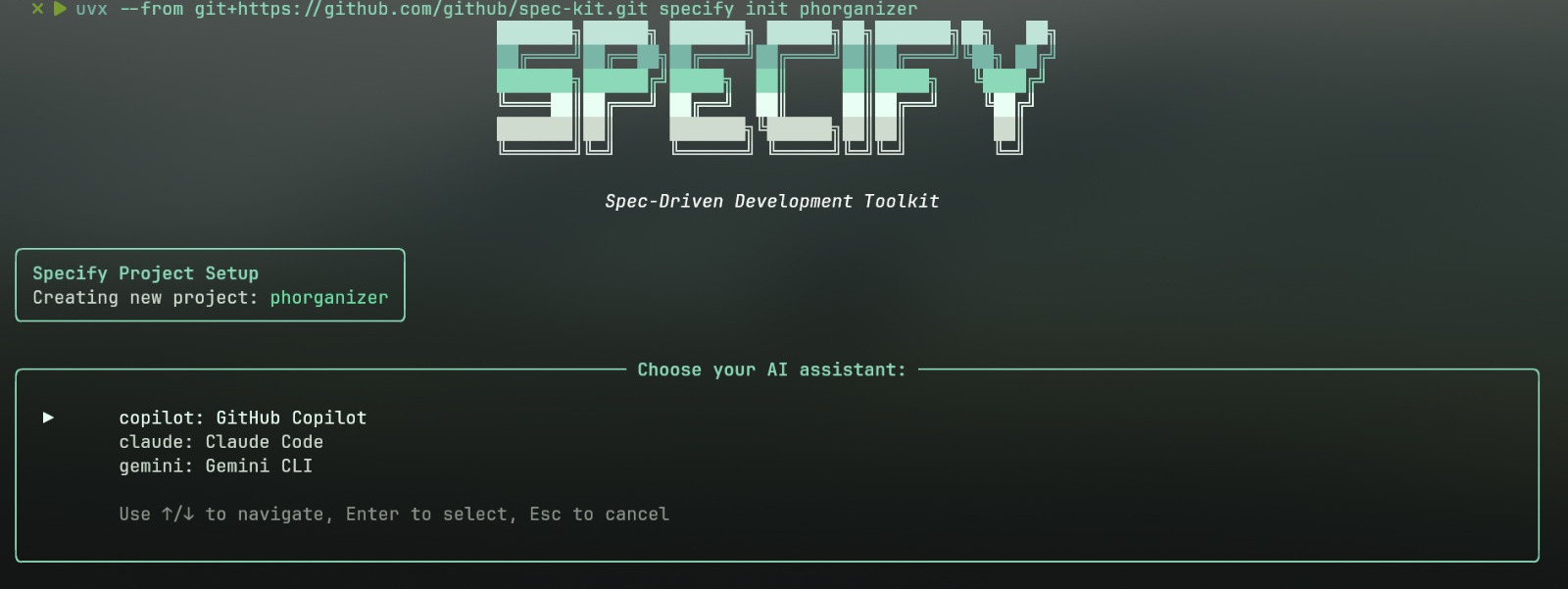
    The process begins with a simple command to initialize your project and set up the necessary structure and templates. You can do this by executing the following in your terminal:  

    uvx --from git+https://github.com/github/spec-kit.git specify init <PROJECT_NAME>. This requires a few prerequisites, including Linux/macOS or WSL2, Python 3.11+, uv, and Git.  

    spec-kit-cli
    spec-kit CLI

    Once initialized, the commands mentioned in the previous section (/specify, /plan, /tasks) are not executed in a separate terminal. Instead, they are used within the integrated chat interface of your preferred AI agent, such as GitHub Copilot in Visual Studio Code. This deep integration makes the methodology more accessible and sticky, transforming a conceptual approach into a practical, repeatable process. It turns a “toolkit” into a “system” for disciplined, reproducible AI-assisted development.  

    The entire workflow can be visualized as a cycle: Idea -> High-Level Prompt -> /specify -> Detailed Spec -> /plan -> Technical Plan -> /tasks -> Actionable Task List -> Implement -> Working Code. This flow includes explicit checkpoints where you, the developer, validate the AI’s output before proceeding, a stark contrast to the unconstrained nature of vibe coding.

    Beyond the Toolkit: Strategic Use Cases and Business Impact

    The value of Spec Kit extends far beyond the technical details of its workflow. Its methodology is particularly useful in three strategic scenarios:

    • Greenfield (Zero-to-One) Projects: When starting a new project, there is a strong temptation to “just start coding.” The spec-driven approach forces a small amount of upfront work to create a solid foundation, ensuring the AI builds exactly what you intend, rather than a generic, and potentially flawed, solution. This discipline prevents major architectural and security issues from being baked into the foundation of the project.  
    • Feature Work in Existing Systems (N-to-N+1): Spec Kit is arguably most powerful when adding new features to a complex, existing codebase. The core logic for these systems often lives “in someone’s head” or is “scattered across Slack conversations”. By creating a spec for a new feature, you force clarity on how it should interact with the existing system, and the spec becomes the living documentation for that feature, ensuring team alignment and reducing costly integration errors.  
    • Legacy Modernization: When modernizing a legacy system, the original intent and business logic are often lost to time. With Spec Kit, you can capture that essential logic in a modern spec, design a fresh architecture in the plan, and then let the AI rebuild the system from the ground up. This allows you to shed inherited technical debt without the prohibitive cost and time of a manual rewrite.  

    To put the strategic advantages into perspective, consider a direct comparison between vibe coding and spec-driven development.

    CharacteristicVibe Coding (Ad-Hoc Prompting)Spec-Driven Development (Spec Kit)
    Primary ArtifactThe CodeThe Specification (The “What”)  
    Developer RoleCode-Slinger, Prompt EngineerArchitect, Orchestrator, Validator  
    Source of TruthThe code itself, institutional knowledge in people’s headsA shared, executable specification  
    Security & SafetyProne to vulnerabilities & catastrophic data loss  Proactive security requirements baked into the spec from day one  
    Scalability & MaintainabilityAccrues technical debt quickly; brittle, hard-to-scale code  Separates “what” from “how”; produces clean, maintainable, and verifiable code  
    Team CollaborationDifficult to align; scattered prompts and tribal knowledge  The spec becomes the lingua franca for human and AI teams  
    FlexibilityDifficult to change course once implementation beginsSimple to update the spec and regenerate the plan/code  
    Best ForSmall, personal, or throwaway projects  Greenfield projects, feature additions, legacy modernization  

    Conclusion: Start Building with Intent

    The choice is clear. While the allure of “vibe coding” is undeniable, it is a high-risk approach that can lead to security vulnerabilities, unmaintainable code, and catastrophic data loss. The future of software development is not about letting AI replace developers but about a structured, spec-driven approach that augments human intentionality. Spec Kit offers a powerful and proven methodology that harnesses the full power of generative AI while mitigating its inherent risks. It elevates the developer’s role from a low-level coder to an intentional architect and validator, ensuring that the software you build is not just functional, but also secure, scalable, and resilient.

    Ready to move beyond vibe coding and start building with intent? Explore how Webloom Labs can help you integrate AI-driven development practices into your workflow.

  • The Rise of AI-Native Startups: What Established SMEs Can Learn

    The Rise of AI-Native Startups: What Established SMEs Can Learn

    The business landscape is undergoing a profound transformation, driven by the relentless march of Artificial Intelligence. While large enterprises are heavily investing in AI, a new breed of agile and innovative companies, known as AI-Native startups, are fundamentally reshaping traditional business models. These ventures, born out of AI’s capabilities, operate with unprecedented efficiency, scale rapidly, and challenge the very notion of a traditional workforce. For established Small and Medium-sized Enterprises (SMEs), understanding the rise of these AI-Native startups isn’t just about keeping pace; it’s about discerning a new blueprint for sustainable growth and innovation in an increasingly AI-driven world.

    The DNA of AI-Native Startups: Beyond Automation

    To truly grasp what defines an AI-Native startup, we must move beyond the conventional understanding of AI as merely a tool for automation or an added feature. As detailed in “The Rise of AI-Native Startups: Building Businesses Without Traditional Teams” on IT Business Today, AI-Native companies embed artificial intelligence into their core operations and strategies from inception. AI isn’t just a component; it is the product, the primary workforce, and often the key decision-maker. This paradigm shift enables businesses to be built on autonomous agents and smart systems that can self-direct and evolve.

    Consider a company where AI autonomously identifies market gaps, generates product ideas, writes and deploys code, handles customer support, manages financial transactions, and even negotiates partnerships. The human role shifts dramatically from task execution to strategic oversight, ethical governance, and managing exceptional cases. This vision is not futuristic; as of 2024, over 73% of early-stage startups globally integrate generative AI into at least one core function, showcasing the rapid adoption of this model.

    Operating Lean and Scaling Fast: Lessons from AI-Native Startups

    One of the most compelling aspects of AI-Native startups is their ability to achieve significant milestones with minimal human teams, often reducing or even eliminating the need for traditional workforces. This lean operational model allows for unparalleled capital efficiency and speed to market.

    • Product Development: AI systems can write code, design interfaces, test features, and iterate based on user feedback. For example, GitHub Copilot is used by over 1.8 million developers and is responsible for 46% of code written in supported languages, demonstrating how AI agents can perform the work of entire development teams.
    • Marketing & Sales: The entire customer acquisition funnel can be automated. AI crafts targeted ad copy, runs campaigns, qualifies leads, schedules demos with AI avatars, and even negotiates initial terms. This data-driven, predictive approach drastically reduces manual effort and costs.
    • Customer Support: AI chatbots and virtual agents handle routine inquiries 24/7, with human intervention reserved for complex or sensitive issues. Tools like Intercom’s Fin or Zendesk’s AI bots resolve over 80% of support tickets without human intervention, leading to significant cost reductions and faster response times.
    • Operations & Finance: AI manages inventory, optimizes logistics, handles invoicing and payments, performs financial forecasting, and ensures regulatory compliance. As IT Business Today notes, the ‘CFO’ might even be an algorithm analyzing cash flow in real-time. McKinsey reports that AI-based logistics tools can reduce last-mile delivery costs by up to 20%.

    This efficiency allows AI-Native startups to reach profitability and scale at an unprecedented rate, often with just one or two founders managing the overarching system. Henry Shi and Deedy Das, in their “Ultimate Guide for Founders: How to start a Lean, AI-Native Startup in 2025” on henrythe9th.substack.com, even envision the first “1-person unicorn,” highlighting the potential for hyper-efficient ventures.

    The Blueprint for Established SMEs: Embracing the Frontier Firm Mindset

    For established SMEs, the rise of AI-Native startups presents both a challenge and an immense opportunity. It necessitates a shift in thinking – adopting what Microsoft’s 2025 Work Trend Index report calls the “Frontier Firm” mindset. This new organizational blueprint blends machine intelligence with human judgment, building systems that are AI-operated but human-led. As the report highlights, “intelligence on tap” is rewiring business, making abundance, affordability, and on-demand availability of intelligence a new reality.

    The journey to becoming a Frontier Firm involves three phases: AI as an assistant, agents as “digital colleagues,” and ultimately, humans setting direction for agents that run entire business processes. This means rethinking the traditional “team” structure, where value creation shifts from large human groups to the strength of AI systems and the vision of their human architects. SMEs must move beyond simply adding AI to existing workflows and instead, redesign the very nature of knowledge work.

    Key takeaways for SMEs from the Frontier Firm concept:

    • You Can Buy Intelligence on Tap: Intelligence is no longer a limited asset. SMEs can scale capacity as needed, with 82% of leaders confident in using digital labor to expand their workforce capacity. This directly addresses the “capacity gap” where business demands outpace human ability, leading to fragmented and chaotic work.
    • Human-Agent Teams Will Upend the Org Chart: Traditional functional silos may be replaced by “Work Charts” – dynamic, outcome-driven models where teams form around goals, powered by agents. SMEs can spin up lean, high-impact teams on demand, accessing expertise without constant re-organizations. The concept of a “human-agent ratio” becomes crucial, balancing human skills (judgment, empathy, creativity) with AI’s efficiency.
    • Every Employee Becomes an Agent Boss: The future workforce will require employees to build, delegate to, and manage AI agents. This “agent boss” mindset is a career accelerator for those ready to expand their scope. SMEs must prioritize AI skilling, as AI literacy is becoming a top in-demand skill, enabling employees to take on more complex, strategic work earlier in their careers.

    Strategic Adaptation: Practical Steps for SMEs

    To successfully navigate this evolving landscape and leverage the power of AI-Native startups, established SMEs can implement several strategic steps:

    Embrace AI Fluency and Infrastructure

    Moving beyond a superficial understanding of AI is critical. SMEs need to explore the capabilities of large language models, autonomous agents, and AI platforms to automate entire workflows, not just isolated tasks. This means investing in robust AI infrastructure, including strong APIs, secure data pipelines, and agent orchestration frameworks. As the “Ultimate Guide for Founders” suggests, tools like Supabase or Firebase for backend and n8n for APIs and automation can provide a solid foundation for AI integration.

    Reimagine Core Functions with AI-Native Principles

    Conduct a thorough audit of your operations to identify where processes could be entirely owned by AI, from input to output. Challenge existing assumptions about necessary human involvement. For instance, tasks like automated bookkeeping and financial analysis, as offered by AI accounting solutions like Digits, demonstrate how core functions can be transformed to save significant time and provide deeper insights. According to IBM, AI can act as a “digital co-founder” for entrepreneurs, extending reach in content creation, marketing, and even complex research, allowing humans to focus on higher-level strategic thinking.

    Prioritize Experimentation and Iteration

    The pace of AI innovation demands agility. Start small with internal pilot projects or collaborate with AI-Native startups to learn directly from their models. The key is to experiment early and iterate fast, focusing on customer-driven priorities rather than waiting for perfection. Tools for rapid MVP development, as outlined in the “Ultimate Guide for Founders,” such as Loveable, Base44, or Bubble, can help SMEs quickly test concepts and gather feedback. This agile approach is essential for mapping out AI opportunities within your existing workflows, as highlighted by Codelevate’s insights.

    Building an AI Governance Charter

    As AI systems gain more autonomy, establishing clear ethical and governance frameworks becomes paramount. This includes defining accountability measures for AI-driven decisions, implementing robust security protocols against data breaches and prompt hacking, and ensuring human oversight. IBM’s 2024 Cost of a Data Breach report indicates that while AI-enabled threat detection can reduce breach costs, poorly governed AI can also introduce new vulnerabilities. Trust in AI systems, both internally and externally, is built on a foundation of responsible deployment.

    Cultivate Hybrid Intelligence

    Identify areas where human skills truly shine—complex strategy, deep creativity, empathetic relationships, and nuanced judgment. Structure your organization to leverage the unique strengths of both humans and AI. The Microsoft Work Trend Index emphasizes that people prefer using AI not to replace human value, but to enhance it. The goal is to create symbiotic human-agent teams where AI handles the scalable intelligence, freeing humans for high-value tasks that drive growth and innovation.

    Overcoming Challenges and Future-Proofing Your SME

    The transition to an AI-powered operating model isn’t without its hurdles. Traditional businesses often face investor skepticism about models with reduced human capital, highlighting the need to demonstrate strong operational efficiency and clear governance. Moreover, the demand for specialized AI talent—from prompt engineers to AI ethicists—is growing rapidly. The Microsoft report projects that by 2026, 97 million new roles will emerge from the human-machine division of labor, emphasizing the need for comprehensive upskilling strategies within SMEs.

    For SMEs, the imperative is clear: invest in AI skilling for your existing workforce. AI literacy is now the most in-demand skill of 2025, according to LinkedIn. This doesn’t just mean understanding how to use AI tools, but developing the “thought partner” mindset—learning to iterate with AI, delegating effectively, prompting with context, refining outputs, and critically evaluating AI-generated content. As Startup Genome’s library suggests, established companies can learn valuable lessons from the agility and innovation of startups in adapting to new technological paradigms.

    The integration of AI into Enterprise Resource Planning (ERP) systems further illustrates this shift. As detailed on Top10ERP.org, ERP systems are increasingly featuring AI enhancements like predictive analytics, natural language processing, and AI assistants, leading to “intelligent ERP solutions.” This means even core operational software is evolving to incorporate AI-native principles, offering SMEs automated processes, better data insights, and improved decision-making.

    The Dawn of the Algorithmic Enterprise for SMEs

    The rise of AI-Native startups signifies more than a new business model; it marks a fundamental redefinition of what a company can be. For established SMEs, this isn’t a threat to be feared but an evolution to embrace. By learning from the agility, lean operations, and AI-centric strategies of these nascent ventures, SMEs can unlock unprecedented levels of efficiency, innovation, and growth. The future belongs to those who are willing to adapt, integrate, and co-create with AI, transforming their businesses into dynamic, intelligent “Frontier Firms” capable of thriving in the algorithmic enterprise. The time to act is now, to ensure your SME is not just surviving, but leading in the age of AI.

    Ready to transform your business with cutting-edge AI strategies? Let Webloom Labs guide your journey. Visit webloomlabs.net/onboard to get started!

  • Unpeeling the Mystery: Why is it Called Nano Banana?

    Unpeeling the Mystery: Why is it Called Nano Banana?

    In the rapidly evolving world of artificial intelligence, new tools and models emerge with increasing frequency, often sporting names that are as intriguing as their capabilities. Among the latest innovations from Google, one particular name has captured the imagination and sparked curiosity: Nano Banana. This whimsical moniker refers to Google’s advanced AI image editing and generation model, officially known as Gemini 2.5 Flash Image. But why, exactly, is it called Nano Banana? Let’s peel back the layers and explore the origins, features, and impact of this fascinating AI.

    What Exactly Is Nano Banana?

    Before delving into the name, it’s crucial to understand what Nano Banana actually represents. At its core, Nano Banana is the catchy, unofficial nickname for Gemini 2.5 Flash Image, a state-of-the-art image generation and editing model developed by Google DeepMind. This powerful AI is integrated into the Gemini app, offering users and developers unprecedented control over visual content creation and manipulation. Launched to address the growing demand for higher-quality images and more powerful creative control, Nano Banana builds upon earlier versions of Gemini’s image capabilities, focusing on precision, consistency, and a deeper understanding of real-world contexts.

    The model’s introduction was met with significant excitement, particularly for its low latency, cost-effectiveness, and ease of use. However, Google didn’t stop there. Feedback from early users highlighted a need for more robust features, especially when it came to maintaining a consistent likeness during edits and blending multiple images seamlessly. Nano Banana steps up to these challenges, making it a standout in the generative AI landscape.

    The Power Behind the Name: Capabilities of Nano Banana

    The capabilities of Gemini 2.5 Flash Image, or Nano Banana, are truly impressive, pushing the boundaries of what’s possible in AI-powered visual editing:

    • Maintain Character Consistency: One of the most significant advancements is the ability to preserve a character’s or object’s appearance across various edits and prompts. This means you can place the same person or pet into different scenarios, change their outfits, or explore new settings, all while ensuring they consistently look like themselves. This solves a major pain point in older AI image models where subtle edits could drastically alter a subject’s likeness.
    • Prompt-Based Image Editing: Nano Banana allows for targeted transformations and precise local edits using natural language. Users can simply describe the desired change – whether it’s blurring a background, removing an object, altering a pose, or adding color to a black and white photo – and the AI intelligently executes the command. This level of granular control empowers creators to bring their specific visions to life with ease.
    • Native World Knowledge: Unlike earlier image generation models that often excelled aesthetically but lacked a deep semantic understanding of the real world, Nano Banana benefits from Gemini’s extensive world knowledge. This integration unlocks new use cases, enabling the model to understand and respond to complex real-world questions and follow intricate editing instructions, making it a powerful tool for educational and creative applications alike.
    • Multi-Image Fusion: A groundbreaking feature is the ability to understand and merge multiple input images into a single, cohesive output. This allows users to combine elements from different photos, restyle a room with a new color scheme or texture from a reference image, or fuse various visual ideas into a brand-new scene with a single prompt.

    These advanced features underscore why Nano Banana has garnered such attention from both casual users in the Gemini app and developers integrating it via the Gemini API or Vertex AI.

    Addressing a Common Frustration: Consistency in Editing

    One of the persistent frustrations with earlier AI image editing tools was the “close but not quite” phenomenon. As David Sharon and Nicole Brichtova from Google DeepMind noted in their blog post, when editing pictures of people or pets, subtle flaws matter. An edit that changes a character’s likeness, even slightly, doesn’t feel right. Nano Banana was specifically designed to tackle this head-on. As Dave Slutzkin observed on LinkedIn, “This update addresses a frequent complaint with AI image tools: small edits that end up changing the entire image.” This focus on maintaining the integrity of the subject, whether you’re trying a new haircut or placing a pet in a costume, is a monumental leap forward in practical AI image editing.

    The model’s ability to maintain a consistent look across various transformations means that creators can confidently iterate on their images without fear of losing the essence of their subject. This is particularly valuable for storytelling, brand asset creation, or simply personal photo enhancements.

    Why the Whimsical Name: Nano Banana?

    Now, to the heart of the mystery: why the name Nano Banana? While Google hasn’t released an official statement detailing the exact reason behind this delightful nickname, it’s common practice in tech companies for internal projects and experimental models to acquire quirky codenames. These names often originate from engineers, product teams, or even just a shared moment of levity during development.

    Several theories circulate regarding the inspiration for “Nano Banana”:

    • Internal Codenames: It’s highly probable that Nano Banana started as an internal project codename. These names are often chosen for their memorability, distinctiveness, and sometimes, their sheer silliness, making them easy to refer to within a development team.
    • “Small but Mighty” (Nano): The “Nano” part could allude to the model’s efficiency and precision. Despite its powerful capabilities, Gemini 2.5 Flash Image is designed to be low-latency and cost-effective, suggesting a “nano” footprint with a “banana”-sized impact.
    • The “Go Bananas” Factor: The Google blog post itself playfully states, “People have been going bananas over it already in early previews.” This suggests the name might be a nod to the overwhelming excitement and positive reception the model received. The developers might have found its capabilities so impressive that they felt it truly made people “go bananas.”
    • Just for Fun: Sometimes, a name is just a name. Engineers, like many creative professionals, appreciate a bit of humor. A name like “Nano Banana” stands out, is memorable, and adds a touch of personality to a complex technological advancement. Trevor Young, in his LinkedIn post, even expressed hope that the nickname would stick, indicating its popular appeal.

    Regardless of its precise origin, the name Nano Banana has undeniably added a memorable and approachable quality to a sophisticated AI model, making it more relatable and engaging for a broader audience.

    Nano Banana‘s Impact on Creativity and Business

    The introduction of Nano Banana marks a significant leap for both individual creators and businesses. For solopreneurs and marketers, tools like this are a game-changer. As Trevor Young highlighted, it offers “huge opportunities for businesses and solopreneurs to create interesting images for social media posts, newsletter/blog articles, reports, proposals etc.” The ability to quickly generate or edit high-quality visuals, maintain brand consistency, and adapt content for various platforms without needing extensive graphic design expertise saves time and resources.

    • Enhanced Marketing Content: Businesses can swiftly create dynamic product mockups, engaging social media graphics, and customized promotional materials.
    • Personalized Visuals: Users can personalize their images, creating unique avatars, scene compositions, or even exploring different styles for their photos.
    • Streamlined Workflows: Developers are already integrating Nano Banana into existing creative software. For instance, the “Dream Prompter” plugin brings Nano Banana directly into GIMP, allowing artists to generate and edit images using AI within their familiar workflow. This seamless integration eliminates the need to jump between applications, fostering a more fluid creative process.

    This integration capability demonstrates a clear path forward: AI tools like Nano Banana are becoming an intrinsic part of existing creative ecosystems, enhancing rather than replacing traditional methods.

    Technical Considerations and the Future of Nano Banana

    While Nano Banana offers remarkable power, it’s important to understand its technical accessibility. The model is available via the Gemini API and Google AI Studio for developers, and Vertex AI for enterprise users. This broad accessibility means that its capabilities can be harnessed by a wide range of applications and platforms. Google also ensures responsible AI use by embedding invisible SynthID digital watermarks in all AI-generated or edited images, clearly indicating their AI origin.

    As with all cutting-edge AI, the development of Nano Banana is ongoing. Google is actively working on improving long-form text rendering, ensuring even more reliable character consistency, and enhancing factual representation within images. Feedback from the developer community is crucial in refining these aspects, highlighting a collaborative approach to AI development.

    Interestingly, some early feedback, like Dave Slutzkin’s observation, suggests that while it excels at editing, its performance for “generation from scratch” might feel different. This could indicate a future where AI image models bifurcate into highly specialized tools for either generation or editing, or perhaps a holistic model that masters both equally. Nevertheless, Nano Banana represents a significant step forward in the overall quality and stability of AI image manipulation.

    Conclusion: The Enduring Charm of Nano Banana

    The name “Nano Banana” might initially sound quirky, but it’s attached to a truly revolutionary piece of technology: Google’s Gemini 2.5 Flash Image model. This AI represents a significant leap in image editing and generation, offering unprecedented control, consistency, and a deeper understanding of visual content. From maintaining character likeness to enabling complex multi-image fusions, Nano Banana empowers creators to realize their visions with greater precision and ease than ever before. While the exact origin of its charming nickname remains somewhat of a mystery, it has become synonymous with an AI that is both powerful and approachable, driving the future of digital creativity.

    Ready to explore how advanced AI solutions can transform your digital presence? Visit webloomlabs.net/onboard to learn more about how Webloom Labs can help your business harness cutting-edge technology.

  • Unlock Growth: A Comprehensive Guide to Automating Your Small Business

    Unlock Growth: A Comprehensive Guide to Automating Your Small Business

    Introduction: The Power of Automation for Small Businesses

    In today’s fast-paced business landscape, small businesses often find themselves under immense pressure to achieve more with fewer resources. The good news? Automation is no longer a luxury reserved for large enterprises. Modern tools and strategies make it accessible and highly beneficial for small business owners looking to streamline operations, save time, and unlock new growth opportunities. From repetitive administrative tasks to complex marketing campaigns, automation can transform how your business operates, making it leaner, more efficient, and more responsive to customer needs.

    As noted by Workday, “Today’s small business owners have automation top of mind—43% reported to Workday that automation is their top priority right now.” This growing recognition highlights automation as a necessity, not just an advantage. By strategically implementing automation, small teams can free up valuable time, gain sharper insights, and create capacity for leaders to focus on what truly drives their business forward.

    Why Automate Your Small Business? The Unmissable Benefits

    The advantages of integrating automation into your small business are multifaceted and impactful, touching every aspect of your operations. Here are some of the most significant benefits:

    • Increased Efficiency and Productivity: Automation tools can process data and complete repetitive tasks with far greater speed and accuracy than manual methods. This means tasks are finished quicker, and your team can dedicate their energy to more strategic, value-adding work. As Salient Process highlights, automation can “free up about 20% of a sales team’s capacity by relieving workers of repetitive, labor-intensive tasks.”
    • Improved Accuracy and Reduced Errors: Human error is an inevitable part of manual processes, especially in areas like data entry. By automating these tasks, businesses can significantly reduce mistakes, leading to more consistent and reliable outcomes across the board, as explained by Rippling’s insights on AI automation.
    • Reduced Operational Costs: Automating processes can lead to substantial cost savings by minimizing the need for manual labor on routine tasks and reducing the overhead associated with overtime or night shifts. It also helps in lowering expenses related to hiring and training for repetitive procedures.
    • Enhanced Customer Satisfaction: Automation enables businesses to provide faster, more consistent, and personalized experiences to customers. From instant responses via chatbots to tailored email marketing campaigns, these tools can significantly improve customer engagement and loyalty, leading to repeat business and higher lifetime value.
    • Data-Driven Decision-Making: AI-powered automation can gather, integrate, and analyze vast amounts of data from various sources, providing a holistic view of your business. This allows leaders to spot trends, identify areas for improvement, and make more informed decisions with greater speed and confidence.
    • Better Compliance and Audit Readiness: Automation can embed role-based approvals, maintain audit trails, and flag missing information, ensuring your business adheres to regulations and internal policies. This is particularly valuable for businesses in regulated industries, simplifying audit processes and building trust.

    Key Areas to Automate for Maximum Impact

    Let’s dive into specific areas where small businesses can leverage automation to achieve these benefits, drawing insights from leading industry experts.

    1. Financial & Administrative Automation: Beyond the Spreadsheets

    Manual financial and administrative tasks are notorious for consuming valuable time and being prone to error. Automation offers powerful solutions:

    Invoicing and Collections

    Automating your invoicing system simplifies billing, minimizes errors, and accelerates payments. Tools like FreshBooks or GoDaddy’s automated invoicing software can generate invoices automatically, send reminders, and integrate online payment options. This not only improves cash flow but also significantly reduces administrative work.

    Payroll and Expense Management

    Payroll can be a complex and time-consuming chore. Services like Gusto (for US) or Collage (for Canada) can put your payroll on autopilot, handling everything from new employee setup to tax filings. Similarly, for expenses, Expensify allows employees to report expenses easily, with administrator controls for approvals, ensuring timely reimbursements and accurate tracking, as noted by Bench.

    Bookkeeping and Sales Tax

    While Bench offers a service to do your bookkeeping for you, many tools can automate aspects of it, pulling expenses directly from bank accounts. For sales tax, especially if you operate in multiple states, platforms like Kintsugi can integrate with your platforms and automate your entire tax cycle, saving hours of calculation and spreadsheet management.

    Receipt and Document Storage

    Say goodbye to mountains of paper receipts. Tools like ScanSnap Scanner and Shoeboxed convert physical documents into digital data, allowing for easy cloud storage, organization, and report generation, making tax season much less stressful.

    Data Capture and Management

    Automating data capture extracts information from various documents and transfers it to a computer-readable format, minimizing manual data entry. This is crucial for maintaining accurate records and providing a “single source of data truth,” especially when integrating systems, as highlighted by Workday and Salient Process.

    2. Streamlining Human Resources: Empowering Your Team

    HR processes, from hiring to performance management, can be overwhelming for small teams. Automation provides consistency and frees up HR professionals for strategic thinking.

    Recruitment and Onboarding

    Automated applicant tracking systems (ATS) can streamline the hiring process, from posting jobs on multiple sites like ZipRecruiter to managing applications in one place, as suggested by Bench. For onboarding, platforms like Trainual allow you to create online training courses, reducing the need to answer repetitive questions from new hires. Workday also notes that automation supports end-to-end HR processes like talent recruitment and onboarding, reducing time lost on manual tasks.

    Employee Management and Scheduling

    Solutions like Bambee can help manage your entire team, store employee files, and track attendance. For staff scheduling, WhenIWork streamlines the process, allowing employees to report availability and clock in seamlessly.

    Fostering a Skills-First Culture

    As discussed by Workday, automation can make skills-first strategies scalable by creating a live inventory of workforce capabilities and linking skills data to learning and development tools. This supports internal mobility and ensures talent decisions are grounded in real-time insights.

    3. Supercharging Sales & Marketing: Reach More, Convert Better

    Marketing and sales are crucial for growth but often strain small teams. Automation can significantly boost effectiveness and reach.

    Lead Generation, Nurturing, and Scoring

    Automation can track, score, and prioritize leads, allowing your sales team to focus on the most promising prospects. Salient Process suggests using website contact forms for automated responses and auto-assigning leads to sales representatives based on criteria. LeadsBridge emphasizes syncing leads to your CRM from various sources, ensuring immediate interaction and conversion opportunities through automated nurturing tactics. Lead scoring tools like those offered by GetResponse also help identify qualified prospects.

    Email Marketing Campaigns

    Email marketing remains a powerful tool, and automation makes it highly efficient. Tools like Mailchimp, Drip, GetResponse, and ConvertKit allow you to send customized bulk emails, automate newsletter subscriptions, and set up nurture campaigns with personalized sequences triggered by user behavior. As GoDaddy’s experts note, automated email campaigns for welcome series, abandoned carts, or birthdays can significantly build community and drive conversions.

    Social Media Management

    Managing multiple social media platforms can be time-consuming. Automation tools like Buffer or Hootsuite allow you to schedule posts across channels, bulk upload content, and set delivery on autopilot, ensuring consistent outreach without constant manual effort. This frees you to focus on interaction, as advised by Bench and GoDaddy.

    Customer Relations Management (CRM)

    CRM systems oversee a customer’s journey from first contact to repeat business. While Zoho offers comprehensive CRM with marketing automation for small businesses, combining CRM with dedicated marketing automation platforms (as discussed by LeadsBridge) provides the best approach. CRM acts as your “source of truth for customer information,” while marketing automation “activates on that data” for campaigns and lead nurturing.

    Customer Service and Support

    Automating responses to frequently asked questions through chatbots or virtual assistants (Tawk is a robust free option) saves significant time and labor, providing immediate support to customers. This improves customer satisfaction and allows human agents to focus on more complex issues, as highlighted by Salient Process and GoDaddy. Rippling further emphasizes that AI-powered chatbots can handle high volumes of requests and provide personalized responses 24/7.

    4. Optimizing Operations & Logistics: Smooth Sailing

    Efficient operations are the backbone of any successful small business. Automation can simplify complex logistical challenges.

    Appointment Scheduling

    Eliminate the back-and-forth of finding a meeting time by automating appointment scheduling. Tools like Calendly or OnceHub display your availability and allow clients to book meetings directly, saving time for both parties, as recommended by Bench and GoDaddy.

    Supply Chain and Inventory Management

    Automating supply chain management is crucial for easing demand and supply checks, ensuring your inventory meets requirements. A real-time system that automatically provides when and how much to order smooths operations, as noted by GoDaddy. Rippling also mentions how AI can predict demand trends and identify inefficiencies in supply chain management.

    Shipping for E-commerce

    For e-commerce businesses, streamlining shipping is a major time and money saver. Tools like Stamps.com for printing postage and Shipstation for tracking order fulfillment, printing labels, and managing customer shipping profiles can automate much of this process, as described by Bench.

    5. Enhancing Decision-Making & Compliance: Smarter Choices

    Making informed decisions and staying compliant are essential for sustainable growth. Automation offers critical support in these areas.

    Data-Driven Decisions and Reporting

    Automating the collection and consolidation of data from various sources (finance, HR, sales, customer service) into accessible dashboards and reports is vital. This ensures data is timely, accurate, and consistent, empowering leaders to make decisions with greater speed and confidence. As Workday explains, a centralized enterprise management platform can integrate systems to create a single source of truth, overcoming data silos that hinder decision-making. GoDaddy advises automating daily reporting from platforms like Google Analytics and Google Ads to get a single view of performance.

    Compliance and Audit Readiness

    Automation helps maintain audit trails, flags missing information, and embeds role-based approvals, significantly supporting compliance. Regularly reviewing workflows and automating documentation capture at the point of action build trust in compliance processes, as detailed by Workday. Rippling adds that AI systems can continuously monitor processes for adherence to regulations and internal policies, flagging potential risks in real time.

    Competitor Analysis and Audience Insights

    Tools like SEMRush can automate competitor analysis, revealing their online marketing strategies, ad budgets, and target keywords. BuzzSumo helps find top-performing content. For understanding your customers, Answer the Public shows keywords people use to search for your industry or products, providing valuable audience insights, as suggested by Bench.

    How to Successfully Implement Automation in Your Small Business

    Embarking on the automation journey requires a clear strategy. Here are practical steps to guide you:

    1. Identify Your Automation Opportunities

    Start by evaluating which tasks are most repetitive, time-consuming, and prone to human error. Focus on processes where automation can deliver the most significant impact, whether it’s customer service, data entry, or marketing tasks. The Rippling team suggests starting with tasks that are most repetitive and time-consuming for you and your team.

    2. Choose the Right Tools

    With a plethora of automation software available, selecting the right platforms is crucial. Consider your budget, the specific features you need (email automation, CRM, scheduling, etc.), and the scalability of the solution. Look for intuitive interfaces and good support. LeadsBridge provides an excellent guide on choosing marketing automation platforms, emphasizing cost, features, scalability, and ease of use.

    3. Start Small and Scale Up

    Don’t try to automate everything at once. Begin with small pilot projects to test the technology and make adjustments. This phased approach helps mitigate challenges and builds confidence before scaling up. Rippling advises treating it like any new software integration, starting small to test and make adjustments.

    4. Train Your Team

    For automation to be effective, your employees need to understand how to use the new tools. Invest in comprehensive training to equip your team with the necessary skills. This also helps overcome resistance to change by positioning AI and automation as tools for optimization rather than replacement, as highlighted by Rippling.

    Overcoming Challenges: Acknowledging the Hurdles

    While the benefits are clear, implementing automation can present challenges, including high initial costs, data privacy concerns, and employee resistance to change. Careful planning, a phased approach, and open communication can help navigate these hurdles, ensuring a smoother transition and maximizing the return on your automation investment.

    Conclusion: Your Automated Future Awaits

    Automating your small business isn’t just about adopting new technology; it’s about adopting a smarter, more strategic way of working. By offloading repetitive tasks, gaining deeper insights from data, and enhancing customer experiences, you empower your team to focus on innovation and growth. Whether you begin with a simple appointment scheduler or dive into comprehensive marketing automation, each step you take towards automation brings your small business closer to its full potential. As Workday aptly concludes, “With cloud-based, AI-driven automation built into a connected platform, small businesses can do more than just keep up—they can scale with confidence.” The future of efficient and scalable small business operations is automated, and it’s within your reach.

  • Exclusive: How OpenAI’s Upcoming Browser Aims to Reshape the Web

    Exclusive: How OpenAI’s Upcoming Browser Aims to Reshape the Web

    The digital landscape is on the brink of another seismic shift. Fresh reports indicate that OpenAI, the powerhouse behind revolutionary AI tools like ChatGPT, is poised to launch its very own web browser. This isn’t just another entrant into an already crowded market; it’s a strategic move positioning OpenAI for a direct challenge to Google Chrome’s longstanding dominance. As the “browser wars” reignite, the implications for how we interact with the internet, and for web Browse innovation itself, are potentially massive.

    For early-stage founders and tech enthusiasts alike, this announcement signals a critical juncture. Will this new “AI browser” truly reshape our online experience, or is it merely another ambitious, yet ultimately marginal, “Google Chrome alternative”? Let’s dive into what we know and what this highly anticipated “OpenAI’s new product” could mean for the future of the web.

    The New Contender: OpenAI’s Bold Leap into Browse

    OpenAI has consistently pushed the boundaries of artificial intelligence, transitioning from research-focused initiatives to products that have permeated mainstream consciousness. Their latest reported venture is a full-fledged web browser, a significant expansion beyond their existing suite of AI models and applications. This isn’t a mere plugin or extension; it’s an entire Browse environment, meticulously crafted by one of the world’s leading AI companies.

    The sheer audacity of the move is noteworthy. The browser market, for years, has been largely dominated by a few key players, with Google Chrome holding an overwhelming majority share. For a company primarily known for its AI research and development to step into this fiercely competitive arena speaks volumes about their vision and the capabilities they believe their “OpenAI web browser” will bring to the table.

    Why Now? The Landscape of “Browser Wars”

    The “browser wars” of the late 90s and early 2000s shaped the internet as we know it, driving rapid innovation and setting standards. While seemingly quiescent for some time, competition has quietly continued, largely around performance, privacy, and feature sets. However, the emergence of advanced AI has introduced a new dimension.

    Existing browsers have started integrating AI features, but largely as add-ons or afterthoughts. OpenAI’s approach, however, promises an “AI browser” built from the ground up with artificial intelligence as its core, foundational principle. This distinction is crucial. It suggests a Browse experience where AI isn’t just a helper but an intrinsic part of navigation, information processing, and user interaction. This fundamental integration could be the differentiator that allows OpenAI to carve out a significant niche, offering a truly innovative “web Browse innovation” that current browsers, limited by their legacy architectures, struggle to match.

    AI at the Core: Unique Features & Innovations

    The most intriguing aspect of the “OpenAI web browser” lies in its presumed “AI-powered” nature. While specific features of OpenAI’s new product are yet to be fully revealed, we can anticipate several game-changing capabilities. Imagine a browser that can:

    • Intelligently Summarize Content: Instantly condense lengthy articles or research papers into key takeaways, saving users invaluable time.
    • Proactive Information Retrieval: Anticipate user needs and fetch relevant information or context without explicit search queries, based on Browse patterns and current tasks.
    • Enhanced Security and Privacy: Leverage AI to detect and neutralize sophisticated phishing attempts, malware, and privacy breaches in real-time, going beyond traditional security measures.
    • Personalized Browse Experiences: Dynamically adapt the interface, content presentation, and even ad blocking based on individual user preferences and cognitive load, creating a truly bespoke online environment.
    • Streamlined Workflows: Integrate seamlessly with other OpenAI tools (like ChatGPT for drafting emails or DALL-E for quick image generation) directly within the Browse interface, turning the browser into a productivity hub.

    These capabilities are not just incremental improvements; they represent a fundamental rethinking of what a web browser can be. They aim to shift the browser from a mere window to the internet to an intelligent assistant that actively facilitates and enhances the user’s online journey. For founders, particularly those in SaaS or product development, understanding these potential shifts in user interaction will be paramount for future product design and marketing strategies.

    A Direct Challenge to Chrome’s Dominance

    The “OpenAI web browser” is being positioned as a direct challenge to Google Chrome’s dominance. Google’s ubiquitous browser has long held the lion’s share of the market, primarily due to its speed, integration with Google services, and vast extension ecosystem. However, its resource intensity and privacy concerns have often been points of contention for users.

    OpenAI’s entry could leverage these pain points. By offering a lean, AI-optimized experience that prioritizes user efficiency and potentially stronger privacy controls (a common desire for a “Google Chrome alternative”), it could attract a significant segment of users disillusioned with the status quo. This isn’t just about market share; it’s about influencing the direction of web standards and user expectations for future online interactions. The “impact of OpenAI browser on web development” will likely manifest as a greater emphasis on AI-driven capabilities and highly optimized, context-aware web experiences.

    What’s Next? Release Date and Outlook

    While the exact “OpenAI browser release date” has not been firmly announced beyond “next year” (implying 2026 from the July 2025 news context), the anticipation is palpable. As an “OpenAI’s new product,” its launch will be closely watched by the tech industry, investors, and, crucially, by millions of users seeking a more intelligent and efficient way to navigate the internet.

    For founders, especially those building AI-powered applications or considering their “startup tech stack,” this development is a clear signal of the intensifying integration of AI into foundational digital tools. It underscores the importance of staying agile and understanding how user behavior will evolve as AI becomes more deeply embedded in everyday technology.

    Conclusion

    OpenAI’s reported foray into the web browser market is more than just another product launch; it’s a statement of intent. By building an “AI browser” from the ground up, they are not just competing with existing players but redefining the very essence of web Browse. This move could fundamentally reshape how we interact with information, consume content, and conduct business online.

    The “browser wars” are indeed reigniting, but this time, the battlefield is intelligence, not just speed or features. For users, it promises a potentially smarter, more intuitive, and highly personalized online experience. For the tech industry, and particularly for early-stage founders, it highlights the accelerating pace of AI integration and the imperative to innovate at the intersection of AI, product, and user experience. The future of the web may soon be in the hands of an AI.